The joy of macros
Macros are abbreviations that expand and get evaluated during export (or after clicking the Preview Tab). A macro can, in fact, do anything a program can do—all that the writer needs to do is type the macro and its arguments.
For example, say I want to embed an image that is small, centered, and with the (rich text) caption “Hello, world!” said the tesseract. “I was born from a tiny two-arg macro.”—something like this:

“Hello, world!” said the tesseract. “I was born from a tiny two-arg macro.”
Tinderbox macros make it possible to embed a cornucopia of interesting objects right in the midst of your text-flow without losing your rhythm. Macro names are brief and semantically consistent, their arguments all follow the same pattern. Arguments are optional whenever possible to improve automaticity.
To embed the captioned image above by hand, I would have to type the following:
<figure><a target="_blank" href="../../../../img/tesseract.gif"><img src="../../../../img/tesseract.gif" alt="Hello, world. I was born from a tiny two-arg macro." title="Hello, world. I was born from a tiny two-arg macro." class="img-responsive center-block well well-sm"></a><figcaption><b>Hello, world</b>. I was born from a <i>tiny</i> two-arg macro.</figcaption></figure>
(Note that the caption must be written multiple times differently because the italics and bold style tags cannot appear inside the alt and title attributes.)
Now—what if you could put 90% of this markup inside a macro that only needs filename and caption as arguments? BoxPress includes a macro called MedaFig that lets you do just that:
^do(MediaFig, "tesseract.gif", "Hello, world. I was born from a tiny two-arg macro.")^
BoxPress includes 52 macros for every kind of content creation. Macros for links, buttons, Glyphicons, SmartButtons, SmartPanels, Wells, blockquotes or pull-quotes (with citation), images, audio, video, various layouts of other notes, and even tables—all this and more are included with BoxPress.
Each TBX has its own set of macros. You can find them in the Macros panel. For example, here’s a look at the MediaWin macro:
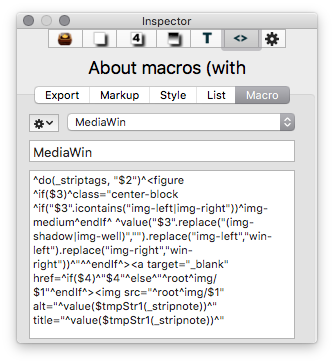
The Macros panel, showing part of the MediaWin macro. Each $n will be replaced by an argument during export.
You can add BoxPress macros anywhere in your writing flow. Just use this formula:
^do( MacroName, [arg1, arg2, … argn] )^