Changelog 1.8
Table of Contents
- Hoisting crash fixed: changed Bips to monochrome
- New prototype: film_note
- New inline help macros
- Improved export: Pager
- Improved export: one-click retitling
- Improved export: Undertitle
- Improved export: audio transcription
- Improved export: background info saved in Theme Manager
- Improved macro: Button
- Directories Dash: Disqus support
- Styles Dash: new Macros Dash
- Styles Dash: improved title scaling
- Styles Dash: improved Navbar Widget
- Styles Dash: improved Banner Widget subtitle styling
- Styles Dash: improved Banner Widget shadow control
- Styles Dash: PostTitle Widget totally rebuilt
- Styles Dash: PostBody Widget now WYSIWYG
- Fully up-to-date for Tinderbox 7.3
Hoisting crash fixed: changed Bips to monochrome
High-end (emoji) Unicode symbols in note names causes Tinderbox to crash upon hoisting. These have been replaced with low-end (monochrome) Unicode symbols which do not cause this problem.
New prototype: film_note
New inline help macros
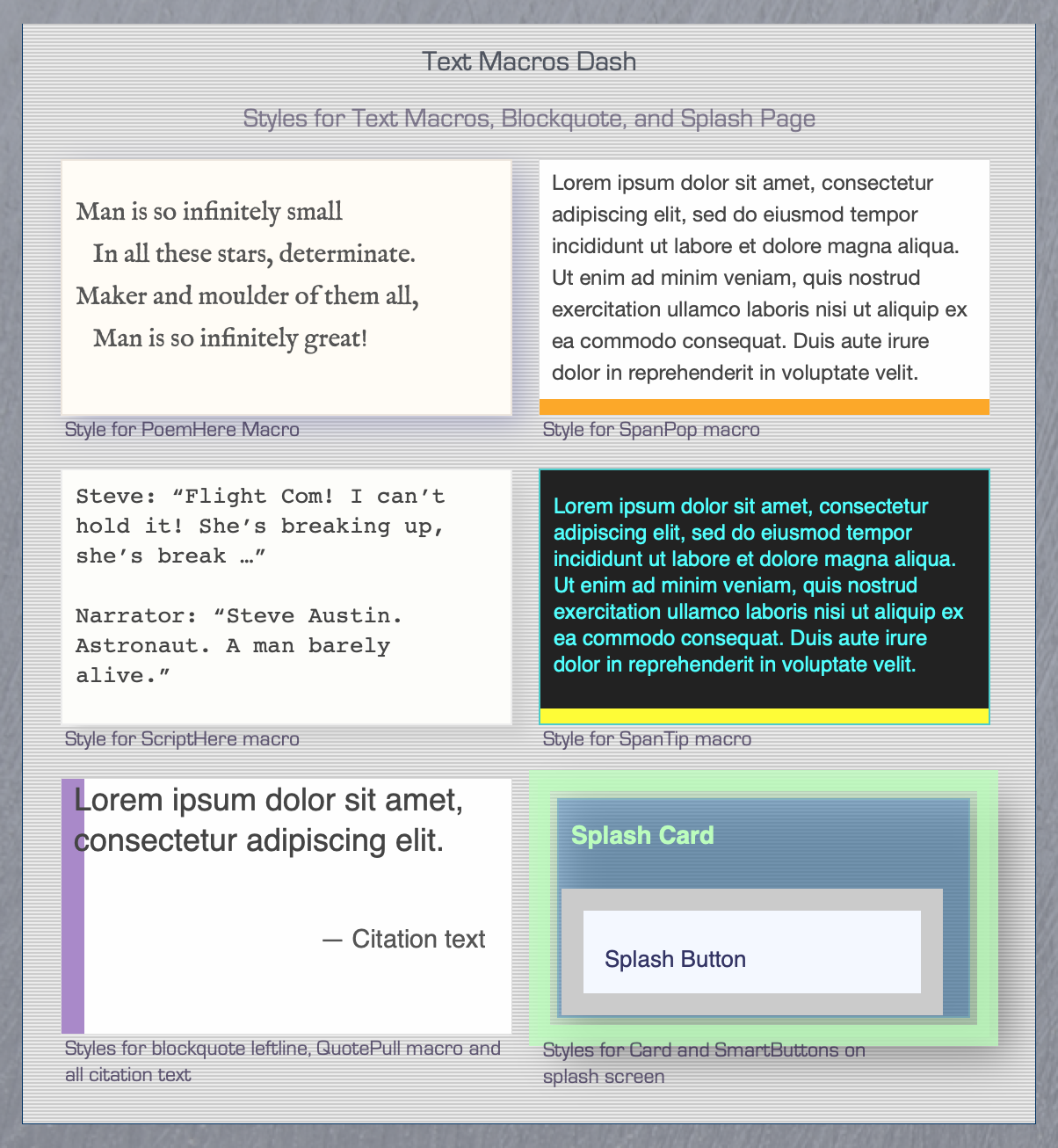
BoxPress now deploys a triple of inline help tips. In addition to SpanDef, there are now SpanTip and SpanPop. The former lets you display styled tooltip text; the latter, styled text and a heading and hyperlinks. Each uses a differently styled link (mist, dotted underline, and solid underline). In order of increasing display richness (and decreasing subtleness), these are —
| Macro | Styling | Heading | Links |
|---|---|---|---|
| SpanDef | NO | NO | NO |
| SpanTip | YES | NO | NO |
| SpanPop | YES | YES | YES |
Improved export: Pager
Good news! As of version 1.8.0, the Up pager button now works at any depth—it even returns you to its originating SmartButton.
Check out the demo Improved export: Pager.
Improved export: one-click retitling
You can now change Banner text (the title and subtitle appearing on every webpage) instantly—without having to re-export the entire site.
Just export blog-main.css after you make the changes in the Styles Dash and all webpages will be updated instantly.
Improved export: Undertitle
Undertitle is now handled by macro so you can include it anywhere in your own templates with a single line of code.
Improved export: audio transcription
Setting the value for the $myPubAVMin, which holds the time position of the audio (or video) being transcribed, is now appended to the note’s name in the Table of Contents.
Improved export: background info saved in Theme Manager
As of version 1.8.0, all background information for the special pages is saved (and applied) via the Theme Buttons. The special pages are:
- Home (with teasers)
- Pages
- About
- Archives
- Categories
- and the cat_note prototype (inherited by the individual Category: ___ pages)
So when you mix and match color, texture, and image for these pages and then apply the Theme Grabber, all your settings are saved to the specified Theme Button.
Improved macro: Button
For the sake of uniformity in macro syntax, the order of arguments in the Button macro has changed: the button’s href now precedes the button’s title.
Directories Dash: Disqus support
BoxPress now supports Disqus.
To add a perfectly placed Disqus comment section to your export, simply enter your Disqus Name into the Directories Dash. To disable Disqus support, leave it blank.
Styles Dash: new Macros Dash
Styles Dash: improved title scaling
BoxPress now lets you scale your Banner title (and subtitle) inside the Styles Dash. The exported banner will then scale to three responsive sizes based on the values you enter.
Styles Dash: improved Navbar Widget
Two improvements:
- The navbar can now have its own font. Just assign a font to the
$NameFontof the NavNorm button. - You can now override navbar CSS with a line of your own to accomplish things that cannot be translated easily from Tinderbox note appearance. For example, you can make it transparent. Put it in
$OtherCSS.
Styles Dash: improved Banner Widget subtitle styling
You can now add CSS for subtitle background. The CSS can contain up to two strings, separated by semicolon. The first string is the background attribute. The optional second string is overlays the first, allowing for endless creative possibilities.
Styles Dash: improved Banner Widget shadow control
Instead of entering info for $ShadowDistance, $ShadowBlur, and $ShadowColor, you now simply enter a single line of CSS. This allows you to have different horizontal and vertical values.
- Banner title — Use
$NameShadowto determine the Banner title. - Banner subtitle — Use
$SubtitleShadowto determine the Banner subtitle.
Styles Dash: PostTitle Widget totally rebuilt
The PostTitle Widget is vastly improved. Setting its $NameFont still assigns the font-family for all headings <h1> through <h1>. But you can now assign a different font-family to the title of your post—that is, to <h1>.
As before, setting its $NameColor assigns the default font-color for all headings. This default is overridden by the individual heading colors you assign via the Heading Colors Widget, which also assigns the background-color for all headings, as well as $OtherCSS which allows you to modify that padding, which should be changed depending on font-family.
Styles Dash: PostBody Widget now WYSIWYG
You now use $NameFont and $NameColor of the PostBody Widget to set the font-face and color for all body text. The font-size can be set (1) via the Text Inspector (use ⌘1 to invoke) , or (2) via the Mac OS Font Panel (use ⌘T to invoke).
For the curious: BoxPress calculates the proper CSS font-size value from the TB-proprietary $MapNameSize during export. This value is then stored in $TextFontSize(dashPostBody)—and can be accessed from there in case you need it for your own Styles Dash-aware CSS additions.
Fully up-to-date for Tinderbox 7.3
Beginning with Tinderbox 7.3, the NOT operator (!) no longer works with comparison expressions (==). I have updated the macros to accommodate this new behavior.