Undertitle options: $blogUnderOpt
SmartButtons are not the only elements that include prototype-specific metadata.
Seven of the BoxPress content prototypes are Research Prototypes. The 7 Research Prototypes are article_note, person_note, book_note, quote_note, quote_ana_note, event_note, and film_note. Exporting a research note will add a useful Undertitle feature to Webpages, Subsections, and SmartPanels.
The great thing about the Undertitle element is that its construction is modular and easily modifiable using the $blogUnderOpt pop-up:
- To access
$blogUnderOptas a key attribute, run the Keys•Tech stamp. - Now add what you want to appear in the Undertitle using the pop-up list. Choose from AUTHOR, TITLE, JOURNAL, and DATE.
When you export, the Undertitle will appear at the top of the Webpage, Subsection, or Panel. Undertitles for article_note use MLA format.
The default settings can be seen here, using the View > Use Columns:
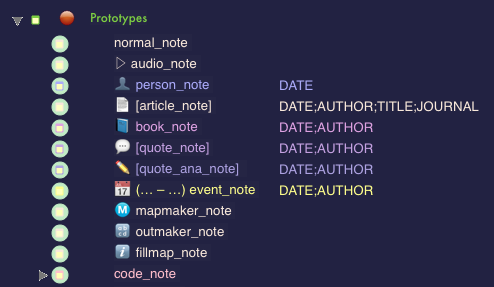
How $blogUnderOpt has been set for your Research Prototypes.
It is by means of their $blogUnderOpt values that your Research Prototypes display their key information under the post title.
You can see the Undertitle constructions for the Research Prototypes in the sampler below: