Adding NavLinks and Dropdowns
Your navbar is determined by the children of BlogNavBar. This comes pre-populated with the following aliases:
BlogNavBar
  BlogTopNote
  @Categories
  @Archives
  BlogAboutNote
The order of aliases inside BlogNavBar determines the order of NavLinks in the actual navbar. The change in their export names is explained just below.
Home | Categories | Archives | About
To add additional notes to the navbar, do the following:
- To add NavLinks to the navbar, add an alias to BlogNavBar. Doing so assigns the name of the alias to
$bpNavName, which determines the name of the button in the navbar. To override this, assign a different value to$bpNavName. BlogTopNote appears in your navbar as “Home” because of this attribute has been set.
Important!
The value of
$bpNavName must be set to something or else the navbar won’t display the :active color you set in the Styles Dash. Unless you specify otherwise, BoxPress will use $Name when you add the note.- To have the NavLink link to a URL, just assign a value to
$URL. - To add NavLinks inside a dropdown menu, make a new note inaisw BlogNavBar and set its
$blogExpOptto DROPDOWN. The children of this dropdown note will be the NavLinks inside the dropdown menu.
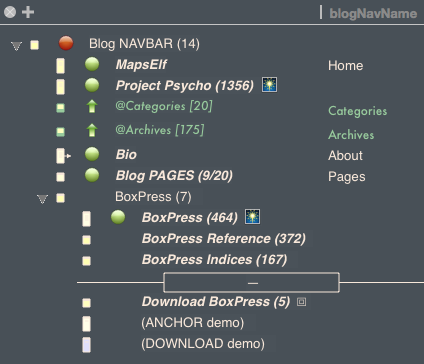
These are the aliases (and three original notes) that have made the navbar of this webpage (with a column showing their $bpNavName). When set, $bpNavName determines the name of the NavLink, otherwise, the name will be the value of $Name.
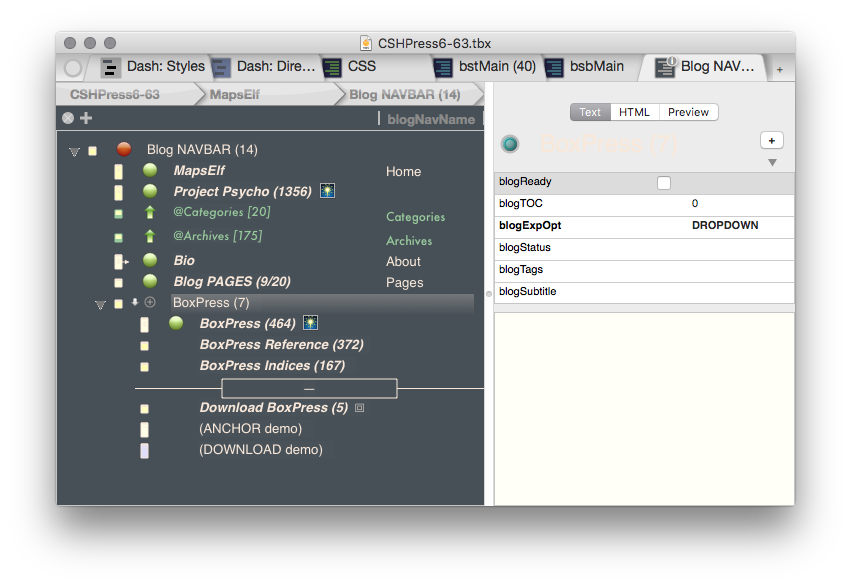
Making the BoxPress Dropdown was easy. I just made a note and set its $blogExpOpt to DROPDOWN. It’s children will then become NavLinks inside a dropdown menu.